Case Study #6 Final

The Process State Diagram


Using the process state diagram, explain why there is no transition:
·         From the READY to WAITING.
    

·         From the WAITING to RUNNING.


Firstly, I’ve just seen a video presentation of the process of job handling in an operating system in a website. As I have observed in job handling, when we start any valid form of application programs, the High Level Scheduler of an Operating System loads entire or just a part of the code’s program from a secondary storage into memory. Then, it construct a structure of data in memory called a process control block that will be apply to hold information of the process, such as its current status and where in memory it is located. When a new process is created, it is given a unique process identification number and a new record is created for it in the process table which includes the address of the process control block in memory.
Dealing with the question “explain why there is no transition from the ready to waiting”, in the ready state of this diagram, only one job must be placed in the ready state at any one time after the job leaves the hold state. In the process state diagram, processes entering the system must be initialized into the ready state first before entering to other states. If a job or a process will enter the waiting state from ready state, it is impossible to have a job that has not yet entered the running state to have a moment of testing the job’s status if it has any interrupts or I/O requests that are needed to be in the waiting state. So therefore, any jobs that have entered the ready state must be initialized first in the running state. It has no transitions to be made if the job is from the ready state and goes to the waiting state. According to the rule, jobs that has I/O or interrupts must be placed in a waiting state before it goes back to the ready state.
On the other hand, the question “why there is no transition from waiting to running” can be answer according to these explanations. First of all, only one process or job can be in the running state at any one time. . The remaining processes will either be ready or blocked, and for each of these states there will be a queue of processes waiting for some event. The lines connecting the process state diagram represent possible transitions from one state to another. Processes entering the system must initially go into the ready state. A process can only enter the running state from the ready state. There would be no transition that would occur when any job transfers from waiting to running. 

Case Study #5 January 5, 2011

BEST-FIT 
In this type of partition, any jobs will only be fitted if they found a block that has the smaller IF.


FIRST-FIT

During this partition, all jobs must immediately fitted ounce they found a right block of memory. 


WORST FIT


During this partition, the block that has the highest IF will be fitted to a job only.


Case Study #4 January 5, 2011

Load the following jobs into memory using dynamic partition and relocatable dynamic partition: (The memory size is 220k with allocated OS for 15k). 


Dynamic Partition


Job 9 & Job 10 are in the waiting list it’s because there are no more free memory spaces available in the Operating System that has a 220k memory size. This is the dynamic partition process.


Relocatable Dynamic Partition


In this cycle of partitioning, compared to dynamic allocation, all free spaces of memory were gathered together to form another new memory space. In letter A, 15k is already in the memory because it is already allocated in the O.S. Jobs 1, 4 and 6 already ended their processes in the letter B and it causes to enter Job 7. Afterwards, some memory was all gathered together again to form a free space to relocate some Jobs that were not yet in the memory.


Unlike what happened in dynamic partitioning process, the Jobs 9 and 10 were not in the waiting list anymore. They already fitted in letters D and E because of memory compactions. 


Case Study #3 December 3, 2010

Name: Jose Diacono Jr
Section: BSIT-2 Day
Case Study #: 3

Question:
In a multiprogramming and time-sharing environment, several users share the system simultaneously. This situation can result in various security problems. Name at least two of these problems. Can we ensure the same degree of security in a time-share machine as we have in a dedicated machine? Explain your answer

A multiprogramming is the allocation of a computer system and its resources to more than one concurrent job or user and time-sharing is the sharing of a computing resource among many users by means of multiprogramming and multi-tasking.  In a multiprogramming and time-sharing environment, several users share the system simultaneously. In the case that multiprogramming is the time and processing resources were often wasted when a single job waited for human interaction or other data input/output operations and time-sharing allowing a large number of users to interact concurrently with a single computer, there are some various security problems that will result by two potential problems in this kind of environment.

I would like to ask myself the question “Where does the time-sharing usually happen?” Some said that it is usually happened in internet shops or cafes where people using the computers that are connected together through Local Area Network cables to a central computer a.k.a “servers”. Firstly, a user can simulate another user's program and memory space. This problem could be very detrimental if, for example, an administrator was running a decryption protocol, and another user stole the decryption program and/or key. And another one is probably stealing or duplicating a user's files. Writing over another program area in memory that belongs to other operating system or another user using system resources like Central Processing Unit or disk space without proper accounting can cause the printer to mix output by sending some sort of data while some other user's file is in the process of printing. Another thing is resource usage may not be completely controlled, and could cause deadlock for certain users. Deadlock is a situation in which two or more competing actions are each waiting for others to finish. For example, if user X had resource 1 and was waiting for resource 2, and user Y had resource 2 and was waiting for resource 1, most probably the deadlock would occur and neither user would be able to make progress in their program, no matter how many time slots they were allocated.  

 Dealing in ensuring the degree of security, I would say that we cannot ensure the same amount or status of security in a time-shared machine as we have in a dedicated machine. Since any scheme of protection created and devised by some people can also be determined or considered as broken or dismantled. If the scheme is more complicated, the denser it is to be assertive of its correct incrimination. Another thing is that time-shared machines are far less secure, and are very easy to overload the buffers. Also they are much weaker and slower to catch any kinds of viruses. Security depends on the key strength number of keys type of algorithm, key distribution system reliability of persons and other such parameters in cryptology hence time sharing or dedicated machines would be the same. Therefore, we cannot ensure the same degree of security in a time-share machine as we have in a dedicated machine.

 Although I admit that there are some varieties of security providing programs are now out in different market places. You can use anti-virus for detecting malicious malware that can cause corruption in the Central Processing Unit (CPU) and in my opinion when it comes to ensuring the same degree of security in a time-share machine, I would probably say that it is complicated.

Case Study #2 December 3, 2010

Name: Jose Diacono Jr
Section: BSIT-2 Day
Case Study #: 2


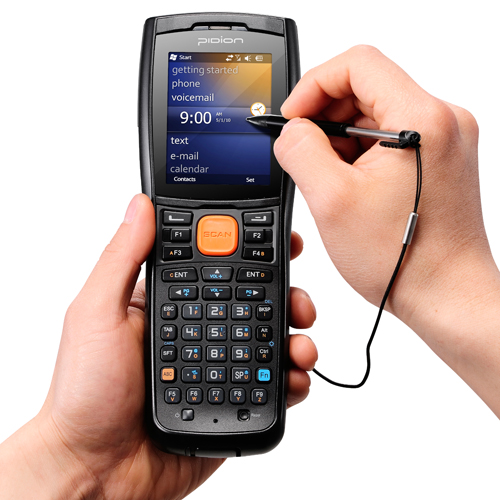
Oh my sidekick, I need an instant reliable and always in my pocket side kick. What is the most reliable and high-tech side kick? Oh! Well it’s only some of hand-held computers that we can rely on. By the way, hand-held computers are those computers that can conveniently be stored in a pocket of sufficient size and used while you're holding it. These types of computers are typically used for personal information manager. It can manage your schedules, keeping names and phone numbers, doing simple calculations, taking notes, and, with a modem, exchanging e-mail and getting information from the Web.


            In some professionals that I’ve encountered, a manager in a supermarket is one of those professionals that I observed using this kind of computer. Lot of us observed that hand-held computers like digital phones are important in our businesses. Well, the manager in the supermarket is actually using it and to state a theory of this matter, I would like to say that they are using it anytime in locating some various problems, learning how the business operates, and getting to know the vendors through these devices. Some of the applications loaded inside in a hand-held computer that could help manage their supermarkets are very helpful to use. When the manager would try to contact some vendors or VIPs, he/she can instantly call them through the use of the device for some important meetings.

Another professional that I thought to have a big usage in using hand-held computers are the media men or Newspaper Reporters. As a student, when stating a theory in their profession, I would like to say that they are too vulnerable in news and events so they need some of devices that can help improve their recording skills in some various areas. Another thing is that media men or newspaper reporters are having some difficulty in reporting or stating their recorded news without any evidences or devices. To prevent this kind of problem, they have to use some gadgets or hand-held computers so that they could easily record things, find out some latest events and locating some current events by the use of mobile website browsers or take some pictures of important events. They might love to use some java applications so that they can establish good performances in their career.

Most of the people nowadays really need some hand-held computers on their careers and jobs so that they can easily function in a different and an instant manner. How great is the technology today in our time, all we need to do is to have a simple click on a device and it will come up with good results.

Case Study-1 Journal (November 24, 2010)

Case Study#:1
Examples of Operating Systems


A) Batch Systems
            According to what I’ve research about batch systems, first and foremost, I found out that batch systems are those inputs that are dependent and relied on punched cards or tapes. It actually measured in throughputs. By the way, the word “throughput” is the average rate of successful message delivery over a communication channel. The operator .batched similar jobs together and then ran in the computer to speed up the processing. One of the example OS of batch system is the OpenVMS or Open Virtual System. It looks like this:
                                                      Open Virtual System


The image above is an example of a batch operating system. OpenVMS has a different kind of names. It is called VAX-11/VMS or known as VAX/VMS.  A multi-user, multiprocessing virtual memory-based operating system (OS) designed for use in time sharing, batch processing, real-time process priorities can be set higher than OS kernel jobs. The OpenVMS operating system can be tuned to perform well in a wide variety of environments. This includes combinations of compute-intensive, I/O-intensive, client/server, real-time, and other environments. Actual system performance depends on the type of computer, available physical memory, and the number and type of active disk and tape drives.


B) Interactive Systems

Interactive systems are those systems that are faster than the batch systems but slower than real-time systems. It is usually used in programs which can provide fast turnaround when debugging. It is also an operating system that allows users to run interactive programs. Interactive systems were command line systems, which tightly controlled the interaction between the human and the computer. Users may require the knowledge of the commands that might be issued and how the arguments were to be ordered. Some of the samples that I encountered during my research is the UNIX operating system.
                                                                   UNIX


Today's UNIX system is robust, scalable, and it continues to provide uniform access to a wide variety of computing hardware. For these reasons the UNIX system continues to be the operating system of choice for mission-critical systems. The UNIX system is the key enabler for enterprises that wish to keep switching costs as low as possible. That is, the UNIX system remains the only open alternative to locking in on a proprietary operating system.

 C)  Real-time Systems

According to what I’ve learned during discussions, this system is fast and a time limit sensitive system. It must be used in time-critical environment like industrial processes, sophisticated medical equipment and etc. It must be 100% responsive, 100% of the time. A sample that I discovered during my own research is the:  Nano-RK
                                                   NANO-RK


This is a Real-Time Operating System designed for the use in sensor networks run by micro controllers.  It supports a fixed-priority fully preemptive scheduler with fine-grained timing primitives to support real-time task sets. "Nano" implies that the RTOS is small consuming 2K of RAM and using 18K of flash, while "RK" is short for Resource Kernel. A resource kernel provides reservations on how often system resources can be consumed. For example, a task might only be allowed to execute 10ms every 150ms, or a  node might only be allowed to transmit 10 network pockets per minute (Network Reservation).


 D) Hybrid Systems

       First and foremost, hybrid systems are those systems that are combined by a batch and interactive system. It accepts and run batch programs in the background. However, there are different kinds of operating systems in hybrid system. One of them is the so called "Linux on ITRON" hybrid operating system architecture for embedded systems.


          ITRON emerged as an ambitious Japanese initiative known as The Real-time Operating system Nucleus (TRON). While the LINUX was designed to provide personal computer users a free or very low-cost operating system comparable to traditional and usually more expensive Unix systems.
This hybrid operating system which is to combine a general-purpose operating system with a real-time operating system is a promising approach to satisfy the real-time property, which are usually required or embedded systems. The paper describes a hybrid operating system architecture called "Linux on ITRON," which is a combination of Linux and a real-time kernel based on the μITRON Specification.


            E) Embedded Systems

            The embedded system is those systems placed in other products. It may add features and capabilities. It is also a computer system designed to perform one or a few dedicated functions. It is embedded as part of a complete device often including hardware and mechanical parts. These operating systems are designed to be very compact and efficient, forsaking many functions that non-embedded computer operating systems provide, and which may not be used by the specialized applications they run. The best example of this is the ANDROID OS.


The Android Operating System is a popular OS in touch phones today. It is also a software stack for mobile devices that includes an operating system, middleware and key applications. The Android SDK provides the tools and APIs necessary to begin developing applications on the Android platform using the Java programming language.
·         System C library - a BSD-derived implementation of the standard C system library (libc), tuned for embedded Linux-based devices
·         Media Libraries - based on PacketVideo's OpenCORE; the libraries support playback and recording of many popular audio and video formats, as well as static image files, including MPEG4, H.264, MP3, AAC, AMR, JPG, and PNG. etc.


_end_

##TITLE##

##CONTENT##